 MicroNotch


Last verified: November 2026
Choose between NotchNook Classic and Pro
Start with the Mac you use. NotchNook Classic runs on Intel and Apple silicon Macs with macOS 14.6 Sonoma or later. It gives you music controls, a calendar and a file tray with AirDrop. Pro requires Apple silicon and adds clipboard history, a terminal, and command approvals for Claude Code and Codex. MicroNotch requires macOS 15 Sequoia or later and adds offline dictation to the clipboard, file and coding tools.
We make MicroNotch. The NotchNook workflows below follow lo.cafe’s product guide and Pro release notes.
At a glance
| Feature | MicroNotch | NotchNook Classic | NotchNook Pro |
|---|---|---|---|
| Regular price | £14.99 once | $15 once or $2/month | $19 once or $3/month |
| Licence and trial | Two Macs, three-day trial | Two Macs, 48-hour trial | Two Macs, 48-hour trial |
| Mac requirements | macOS 15 Sequoia or later | macOS 14.6 or later, Intel and Apple silicon | macOS 14.6 or later, Apple silicon |
| External display | Compact panel | Virtual notch | Virtual notch |
| Files | Shelf, ZIP and AirDrop | Tray and AirDrop | Tray, AirDrop and format conversion |
| Clipboard history | Search and pin clips | Uses the system clipboard | Search and filter saved clips |
| Coding tools | Support varies by connection. Project Terminal | None | Claude Code and Codex approvals, plus a terminal |
| Offline dictation into other apps | MicroVoice after a model download | No | No |
NotchNook quotes prices in US dollars. The 2026 Black Friday offer lists Pro at $9.50 once through 30 November. Check NotchNook’s current pricing.
Send a file while you’re in another app
Drop a PDF into NotchNook Classic’s tray, switch to Mail, then drag the PDF out to attach it. Use the AirDrop option if you’re sending it to a nearby device. Pro adds a Drop Area that can convert supported files. If you hand off images as well as documents, check whether it converts the format you use before buying. See the NotchNook Pro file tools.
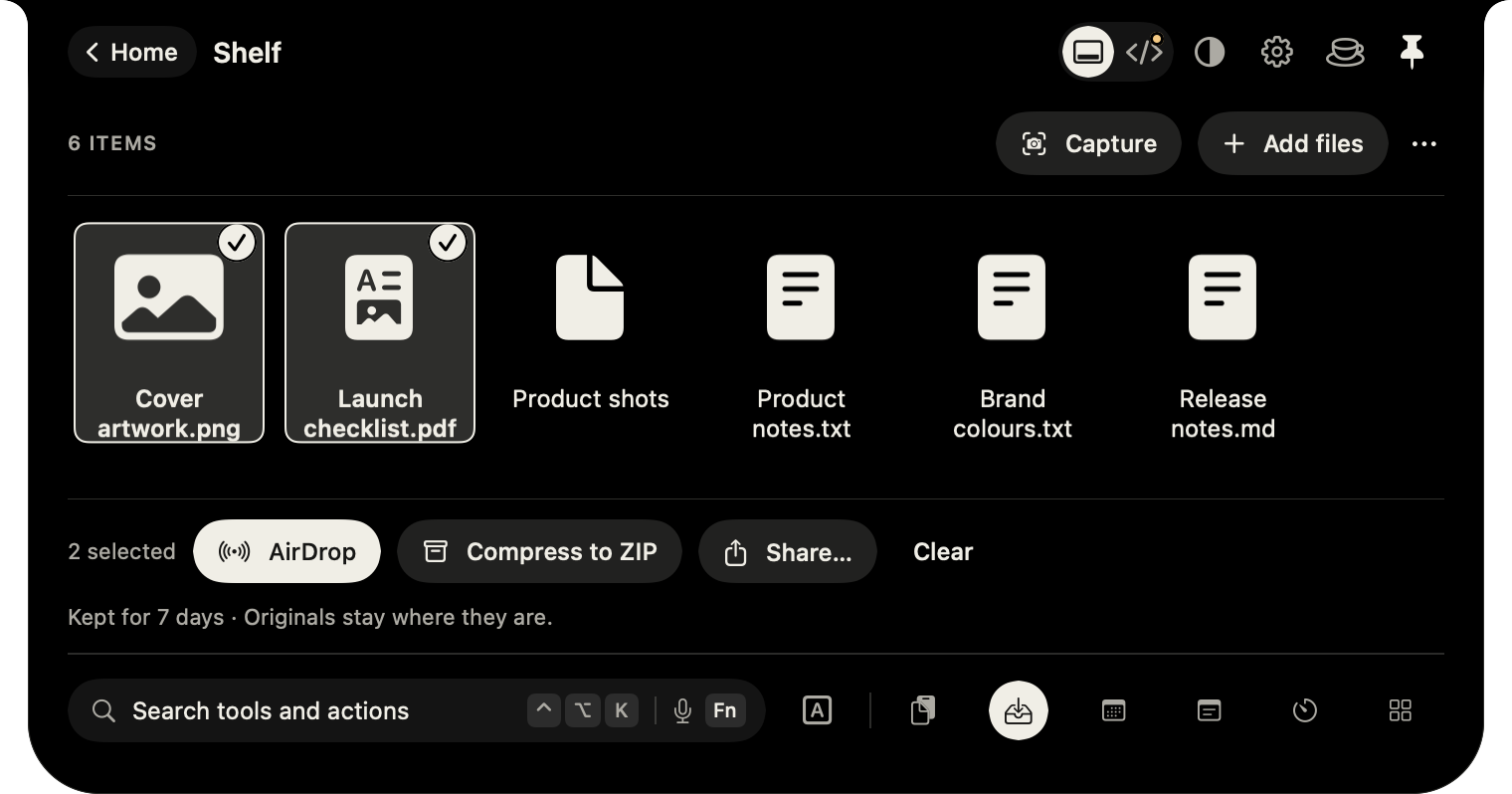
In MicroNotch, park the PDF on File Shelf, then drag it into Mail or share it with AirDrop. If you need to send a PDF together with several screenshots, select the files on the shelf and make a ZIP. Classic covers the simple handoff. The choice between Pro and MicroNotch depends on whether you routinely convert individual files or bundle several into one attachment. See MicroNotch File Shelf.
Find something you copied yesterday
In NotchNook Pro, open Clipboard from the notch or the bottom shelf, search for part of the copied text, then narrow the results by category if needed. Classic has no history in the notch, so keep an existing clipboard manager if you go with Classic and need to retrieve older clips.
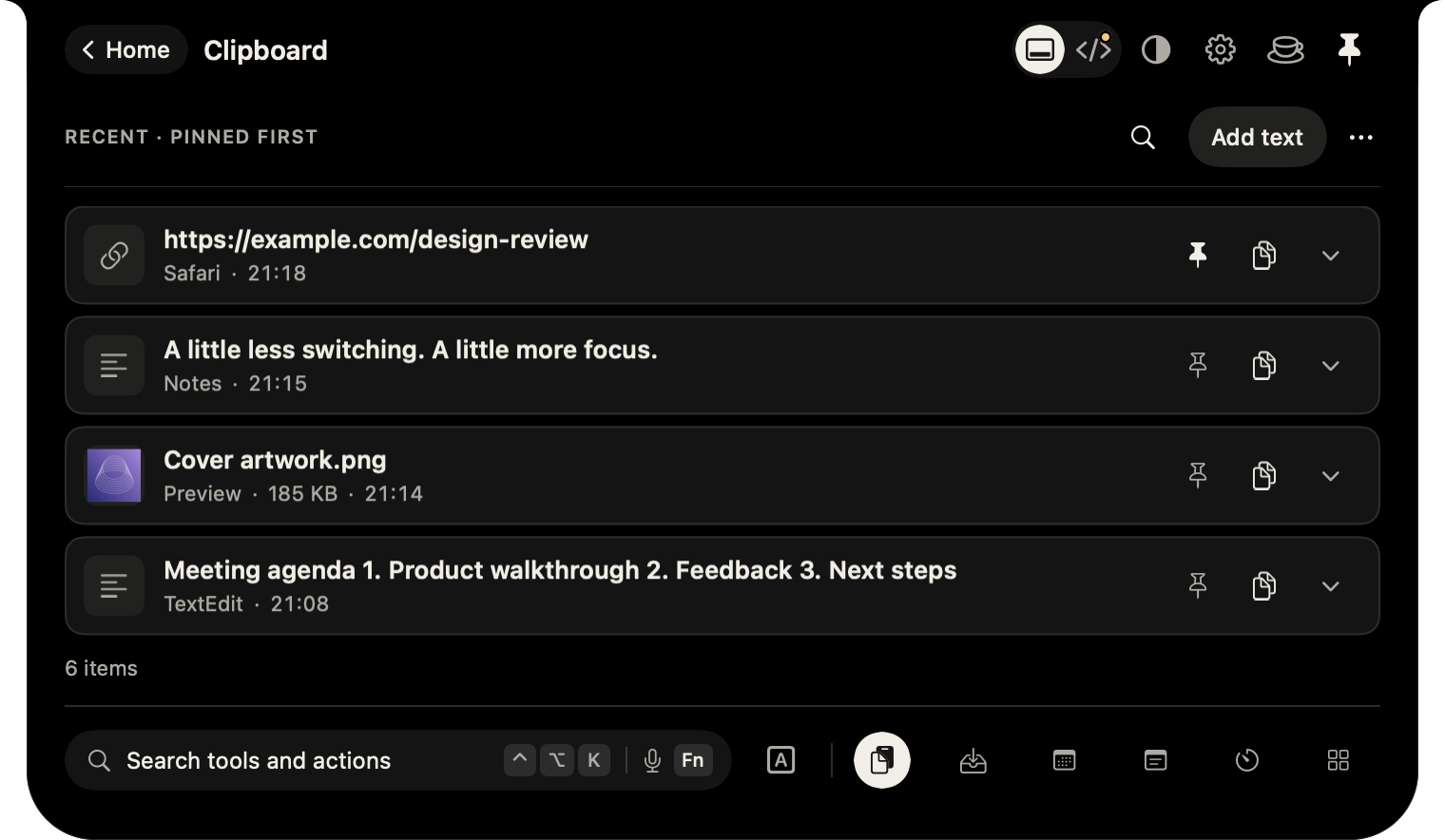
In MicroNotch, enable clipboard history first. Search for the link, expand the clip to check it and pin it if you’ll need it again. The history stays on the Mac. Try finding the same link in Pro and MicroNotch while a full-screen app is open. The panel location and the way you narrow results matter more in daily use than the presence of a Clipboard row in the table. See MicroNotch’s clipboard.
Deal with a coding request without losing your place
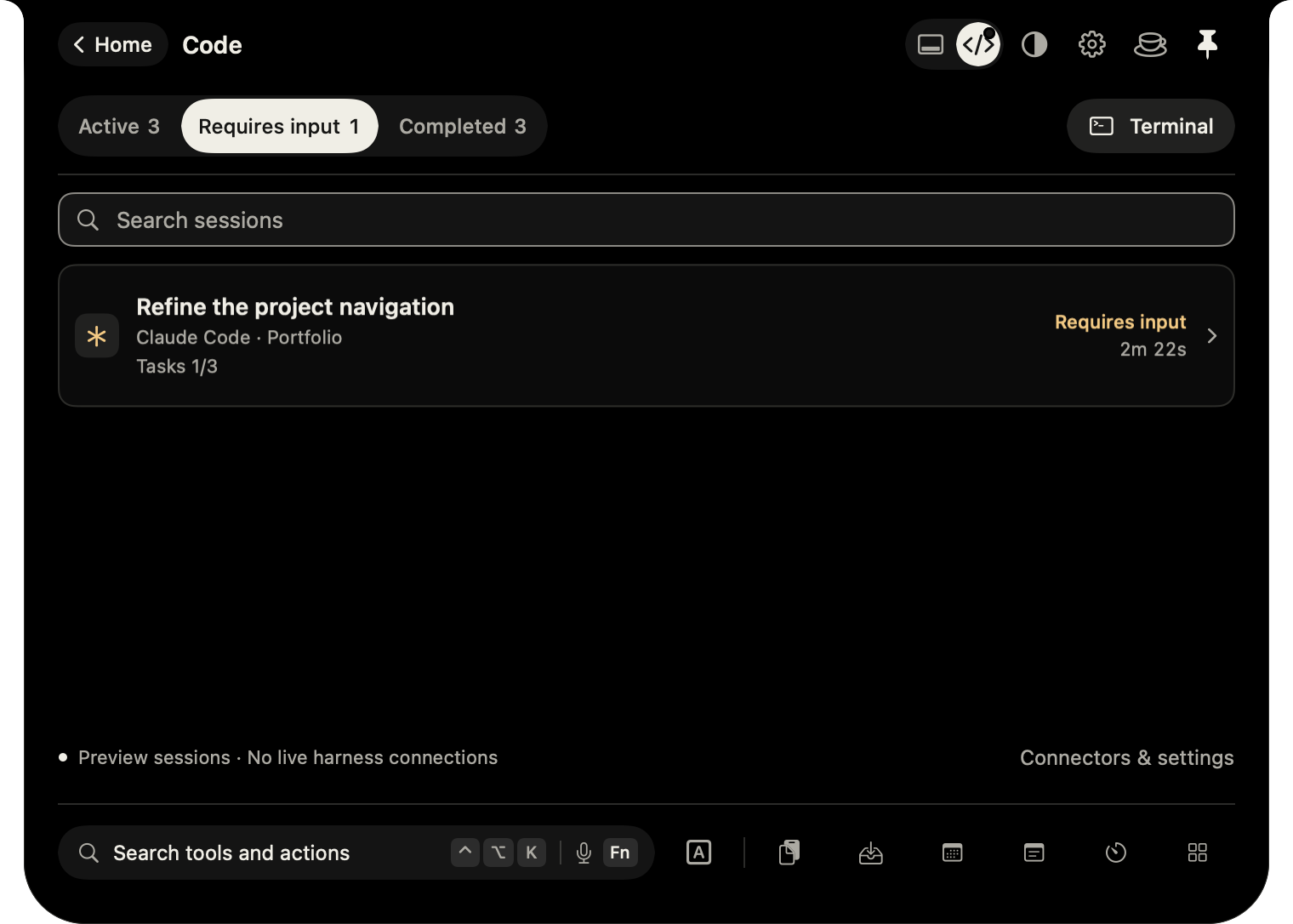
Say Claude Code pauses for permission to run a test while you’re reading a diff. NotchNook Pro shows supported Claude Code and Codex requests in the notch so you can review the command and answer there. MicroNotch offers similar controls for supported connections. In MicroNotch, you can also open Project Terminal in the session’s working directory and run the check yourself. See the approval screen.
If you use Codex, check which connection you work in. MicroNotch handles supported questions from Codex desktop, while standalone CLI approvals require you to enable the feature and trust the hook. Cursor and Antigravity can show session activity, with replies handled in the original app or terminal. See the controls for each MicroNotch connection.
Which one suits your Mac?
- Pick NotchNook Classic if the notch is mainly for music, calendar and AirDrop, especially on an Intel Mac with Sonoma.
- Pick NotchNook Pro if you run Apple silicon and want the file conversion or bottom-shelf clipboard alongside Claude Code and Codex controls.
- Pick MicroNotch if you use Sequoia or later and want to dictate into Slack, Mail or your editor as well as use the clipboard and a project terminal. Confirm dictation on the Mac you intend to use. The MicroVoice model is designed for Apple silicon and Intel compatibility is unverified.
Frequently asked questions
Can I buy NotchNook outright?
Yes. Both Classic and Pro have one-time and monthly prices. Use the table above to compare the regular prices, and check lo.cafe if there’s an active offer.
Does MicroNotch work on Macs without a notch?
Yes. It opens as a compact panel at the top of the screen, including on an external display.
Does MicroVoice send my audio to the cloud?
MicroVoice transcribes on your Mac. Download the model once, then dictate offline.
Can I install MicroNotch with Homebrew?
Yes. MicroNotch is Developer ID signed and notarised by Apple.
brew install --cask microapps-repo/tap/micronotchTry MicroNotch free for three days
Download MicroNotch for Mac · See the other Mac notch comparisons